Payment before dispatch
Tell the customer their order is ready to dispatch and take payment there and then.
What it does
Send customers a payment request when their order is ready to dispatch.
When to use it
Use it for orders that need payment before release, such as proforma orders or accounts over their credit limit.
What the customer receives
When your system reports that an order is ready to dispatch and payment is required, the customer's opted-in contacts receive a WhatsApp message like this:
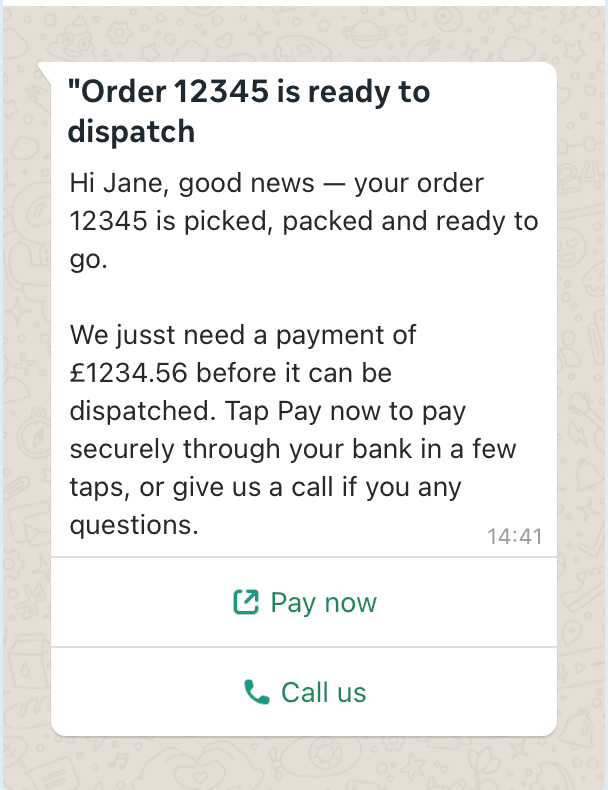
The message includes:
- The order number, so the customer knows exactly which order it covers
- The amount due before the order can be dispatched
- A Pay now button that opens a secure Open Banking payment, pre-filled with the exact amount
- A Call us button that puts the customer straight through to your customer service team
What you need to do
There is no event to configure in the ProConnect admin panel. Your onboarding manager enables this early-access service and agrees the message wording and buttons with you. Your ERP triggers the message.
- Ask your onboarding manager to enable this use case.
- Check that your customers and contacts are ready using the WhatsApp onboarding guide. Messages go only to opted-in contacts.
- Agree with your ERP/IT team when the message should be triggered.
What you'll see
The customer's opted-in contacts receive the message shown above, with the relevant order or invoice details and a route to your team.
For your ERP/IT team
- Your ERP or back-office system triggers the payment before dispatch event through the ProConnect API, passing the order reference, the customer reference, and the amount due.
- ProConnect matches the customer reference to the customer and sends the pre-approved template to their opted-in contacts.
- The customer taps Pay now and pays through their own banking app. The payment is pre-filled with the exact amount, so there is nothing to type and nothing to get wrong.
- Once payment is received, your team can dispatch the order as normal.
If the customer would rather speak to someone first, the Call us button connects them to your customer service team.
If something goes wrong
- A customer receives no message: open CRM → Contacts and check the contact is linked to the correct customer and has opted in. Follow the onboarding guide if their details need correcting.
- The reference or amount is wrong: check the order or invoice in your ERP and ask your ERP/IT team to correct the event details before another message is sent.
- Details and consent are correct but delivery fails: ask your ERP/IT team to check the event response. Give them the affected order or invoice reference and the time it was triggered; do not repeatedly resend it.